> For the complete documentation index, see [llms.txt](https://help.creatoryogames.com/llms.txt). Markdown versions of documentation pages are available by appending `.md` to page URLs; this page is available as [Markdown](https://help.creatoryogames.com/tutorials/using-cyc-notes/deleting-notes.md).

# Deleting Notes

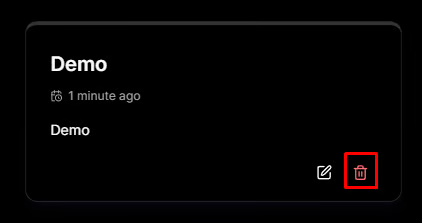
1\) To delete a note, navigate to the [**homepage**](https://cyc-notes.creatoryogames.com) or the [**notes page**](https://cyc-notes.creatoryogames.com/all-notes).

2\) Hover on the note you want to delete.

3\) Click "Delete" on the dialog that appears.

<figure><img src="/files/Nn5mKCkL6JJOMaWSvlTd" alt=""><figcaption></figcaption></figure>

{% hint style="danger" %}
Deleting a note **cannot** be undone under any circumstances. Please be certain.
{% endhint %}